
You will not be allowed to compare more than 4 products at a time
View compare
The TING pen
Here's how it works
Here you'll learn how to set up your TING pen, upload audio files, and get the most out of it. You might find the answers to your questions in the FAQ.
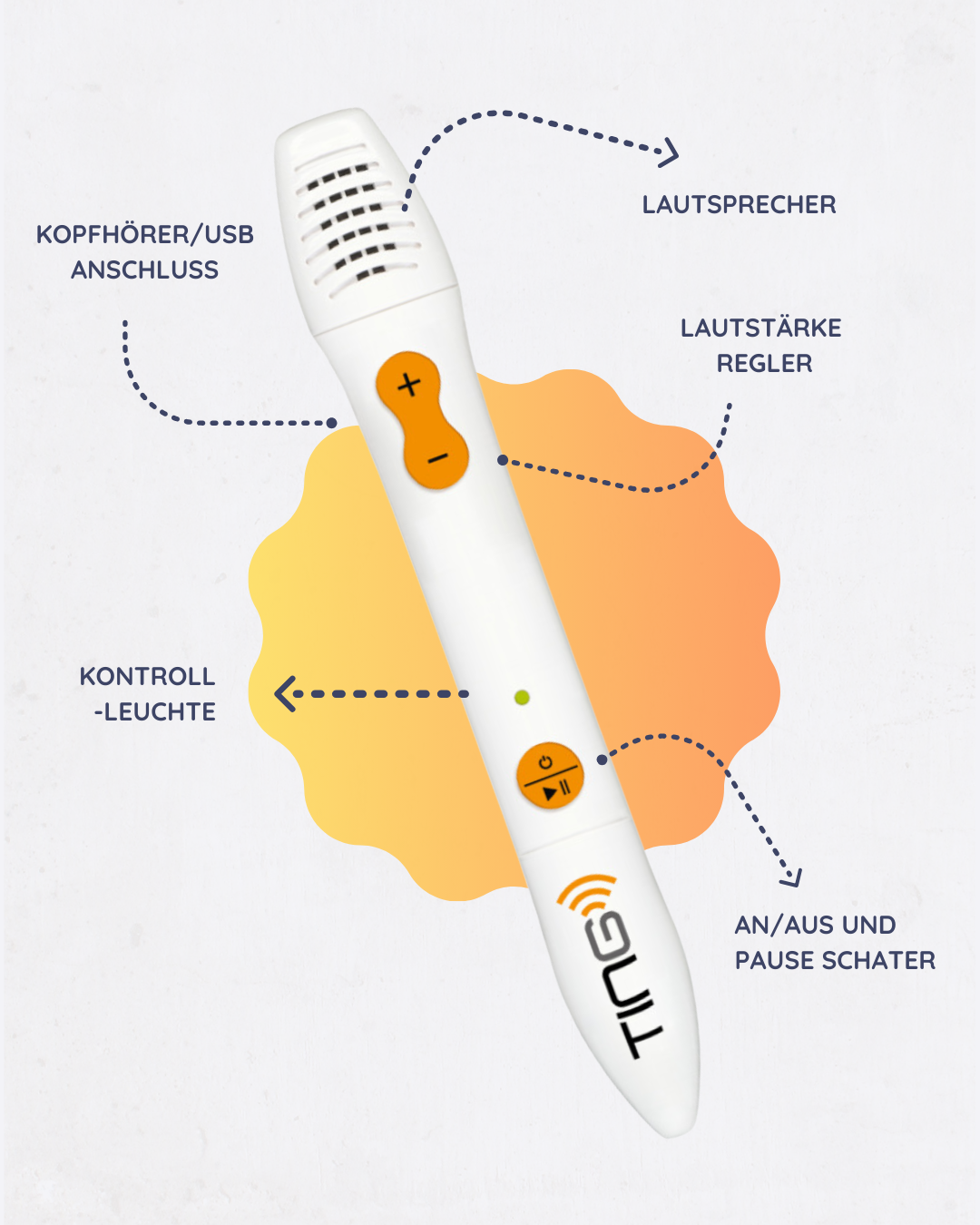
The TING pen
Structure and functions
The speaker plays the sound, and the volume buttons control the volume. The headphone/USB port is for charging and external headphones. The indicator light shows the pen's status. The power and pause buttons turn the pen on and off or pause playback.
briefly explained
Explainer video
How to use the TING pen
Detailed instructions
step by step
-
1. Turn on the pen
Press the power button until the small light on the pen illuminates.
-
2. Book Connect
Tap the activation logo in the book so the pen can recognize which book you are using.
-
3. TING Software
Download the TING pen software (Mac or Windows) from the downloads section and install the software on your computer.
-
4. Download content
If you haven't used the book before, switch off the pen and connect it to your computer via USB. The corresponding audio files will be downloaded automatically.
-
5. Use a pen
Tap the stylus on images, text, or symbols in the book to play the audio files. You can also use headphones.
Ting Software
Downloads
Here you can download the TING software to your computer.
Problem not solved?
If you are still having problems or your question has not yet been answered, please feel free to contact us.